Check local devices
Check a USB camera and audio path locally.
Select a Windows camera and separate audio input and output devices, then verify the NV12 preview, PCM 48 kHz stereo audio, waveform, and AV timing on one screen.
Before you start
What you need
- USB Camera AV Monitor installed on a Windows 11 x64 PC.
- A Windows Media Foundation camera with an available NV12 resolution and frame rate.
- Audio input and output devices that support WASAPI shared mode with PCM 48 kHz two-channel float.
Signal path
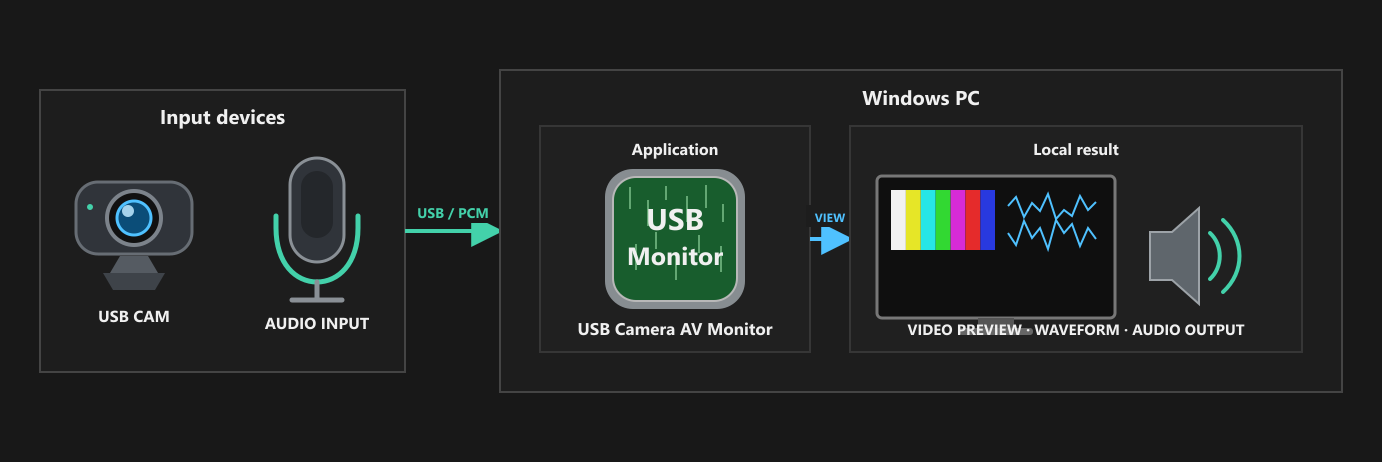
Setup
Configure and verify one stage at a time.
- Connect the camera and audio devices, then confirm that Windows recognizes each device.
- In USB Camera AV Monitor, select the camera, an available NV12 resolution and frame rate, the audio input, and the audio output.
- Start monitoring and keep the video preview, both waveform channels, audio output, and status visible.
- Confirm that the picture updates, the waveform reacts to the intended input, and audio plays through the selected output while you compare the video and audio timing.
- Change CH1 or CH2 volume, mute, or output delay one control at a time when checking the monitored output. Stop before changing devices, and reload the device list after reconnecting hardware.
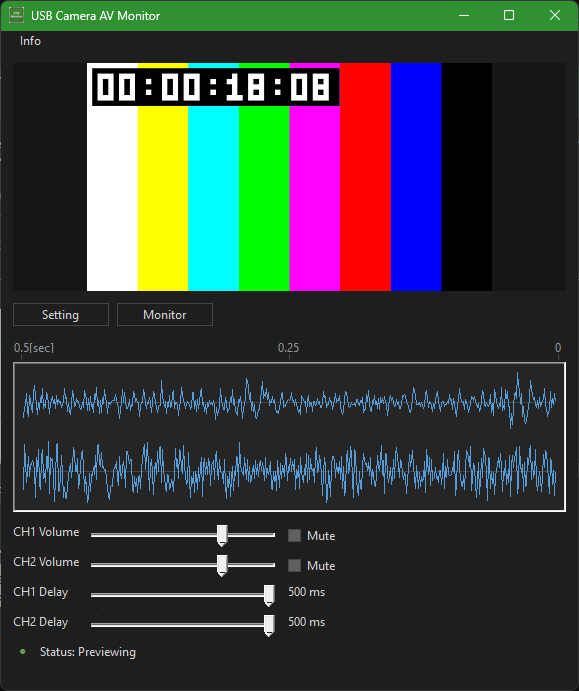
What to verify
Check the result before relying on the path.
- Devices: the intended camera, audio input, and audio output appear in the selectors and remain available after monitoring starts.
- Video: the selected NV12 resolution and frame rate produce a stable, updating preview.
- Audio: both waveform channels respond to the intended input and playback uses the selected output without unexpected mute, level, or timing differences.
- Scope: the result confirms this local monitoring path only; the application does not record, stream, change another application's settings, or provide long-running monitoring.
USB Camera AV Monitor